 Sticky Brain
The board
Four columns — Inbox, Doing, Waiting, Done — and a stack of sticky notes you drag between them. Doing carries a work-in-progress limit so the column reads 1/3 at a glance. New notes land in the column you choose in Settings. Every column has a dashed drop zone when it's empty, so the first note always has somewhere to go.
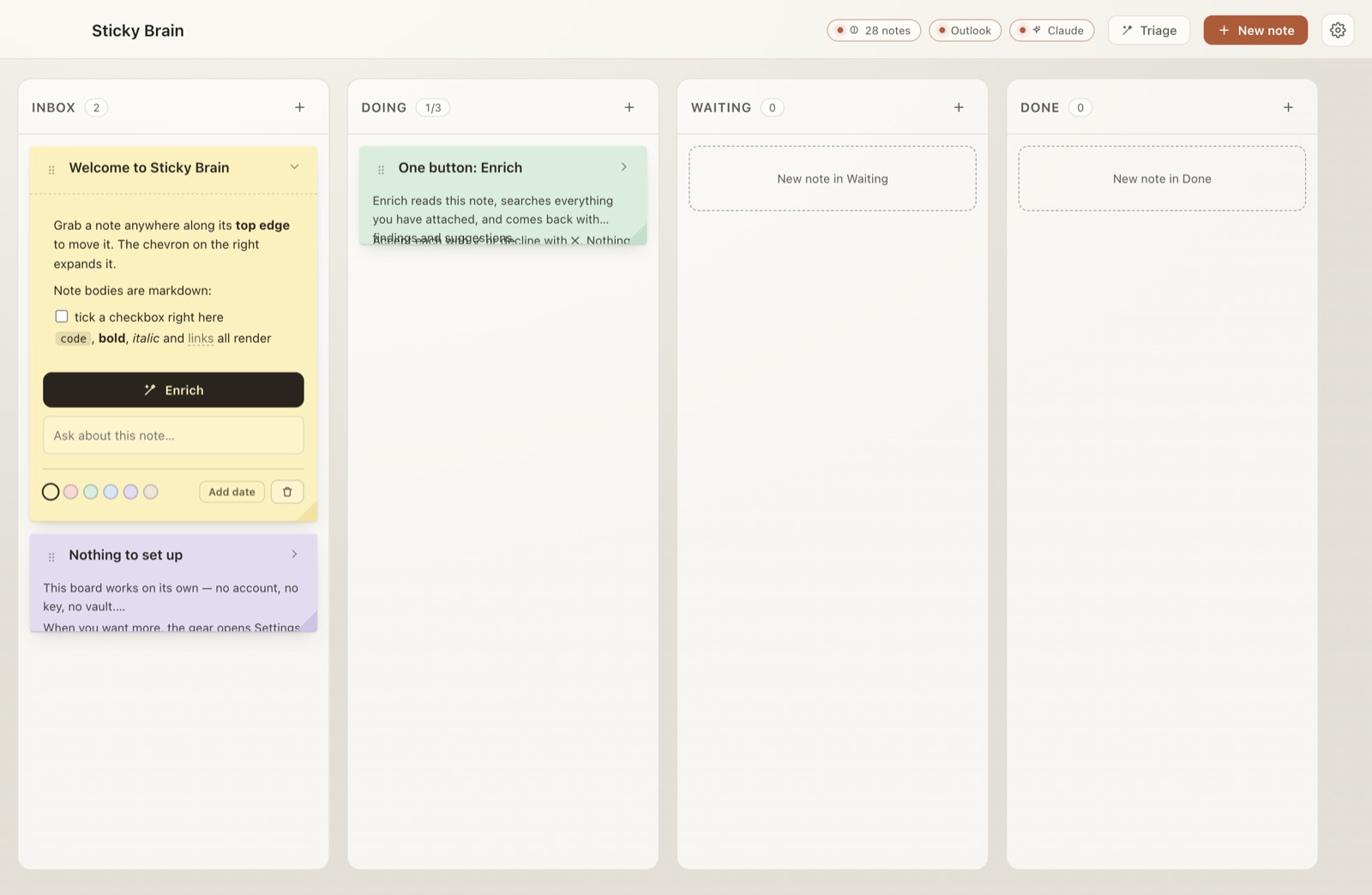
The toolbar shows what's connected — vault note count, Outlook, Claude — with a status light each, a Triage button that runs accept-or-ignore across every note at once, and the gear that opens Settings.
Notes
A note is paper, not a card. Collapsed, it shows its title plus badges for what's attached — 2 notes, 1 mail, due Sep 4. Expanded, it's a small workspace: body text, attached evidence, and the Enrich button.
- Markdown bodies. Headings, bold, italic, code, fenced blocks, quotes, links, lists. Click a body to edit the source; click away to render it again.
- Live checkboxes. Task checkboxes are real: tick
- [ ]directly on the note and the underlying text updates. - Six pigments. Butter, rose, mint, sky, lilac and sand — each re-mixed per palette so the same note reads right in light, dark, natural and magical.
- Due dates, tags, and a per-note color live in the note footer. Nothing else competes for space.
- No raw HTML, ever. The markdown renderer is hand-rolled and emits React nodes, not HTML. Bodies carry vault content, pasted text and Claude output, so there's simply no unsafe path to worry about.
Rendering and interactive checkboxes can both be turned off under Settings → Notes.
Enrich — the one button
A note has exactly one content action. New capability becomes a new kind of recommendation in the same accept/decline list — never a second button.
Expand a note and press Enrich. One pass:
- Searches your Obsidian vault against the note's title, tags and body.
- Sweeps every connected Microsoft 365 account — mail, calendar, tasks.
- Hands Claude the note plus everything found, and asks what actually matters.
Back come findings (evidence worth attaching) and recommendations (a next step, a due date, a tag, a column move), each with a one-line reason. Accept with ✓, decline with ✕. Nothing touches the note until you click. Accept all takes everything still open; Done clears the list.
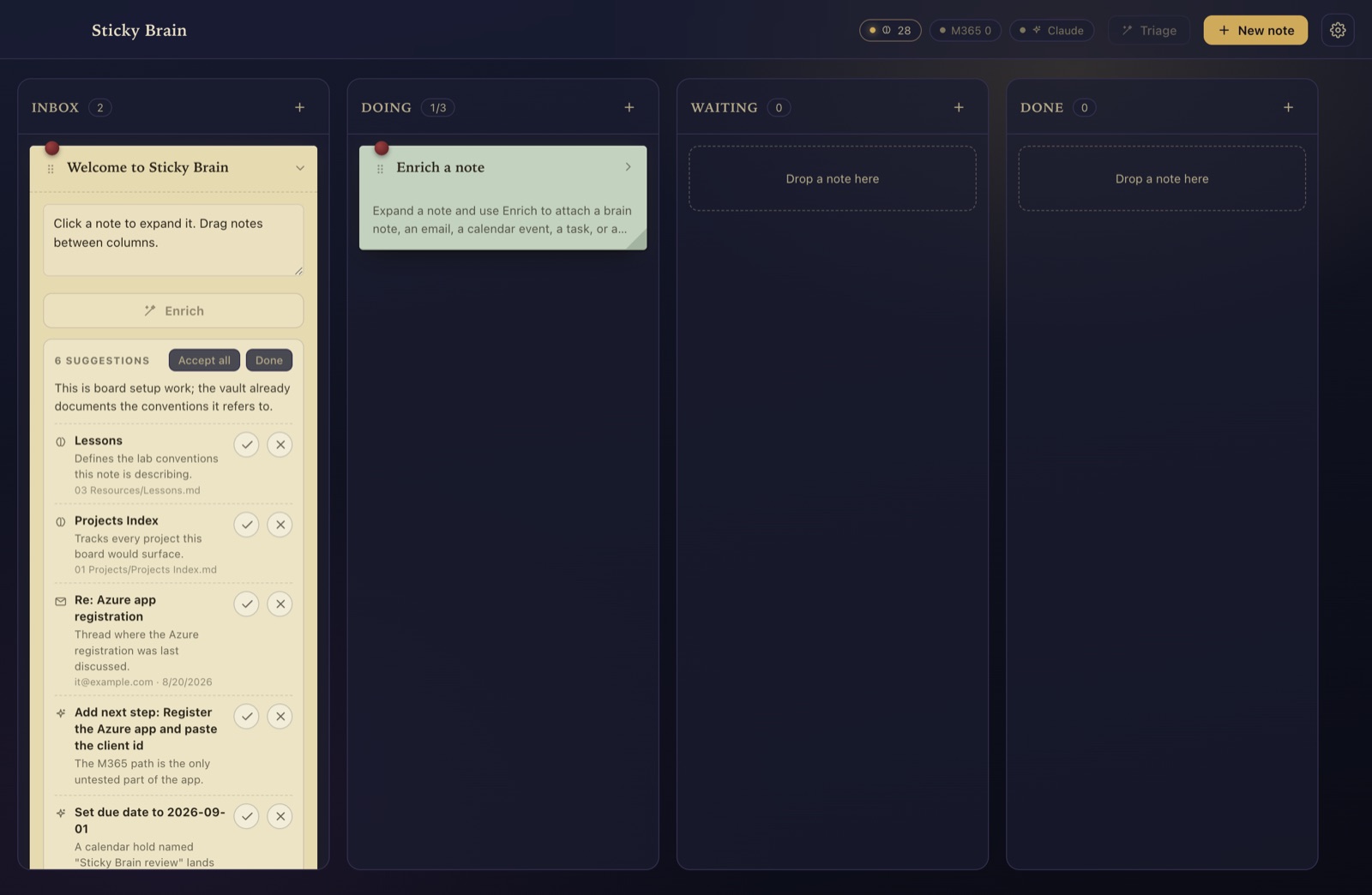
Claude can only propose things that exist. Findings are picked from a candidate list built by local search, and every id is re-checked against real data before it can reach the board. Dates must parse; tags you already have are filtered out. If a source is unreachable, that source is reported as a problem and the rest of the pass still runs.
The Ask about this note… box below Enrich is for anything else — a question, or "draft a reply to that email". Drafts are never sent.
Vault sync
Off by default. Turn on Store notes as markdown files and each card becomes a real note in a folder you choose, with a sticky-id in its frontmatter for identity. Enabling it runs a scan, then shows you the exact list of files it will create or modify. Nothing is written until you confirm.
The safety rules, in order of how much they matter
- An edit you make in Obsidian is never overwritten. Before every write the file is re-read and compared against what Sticky Brain last wrote. If it differs, the write is refused and the card is flagged.
- Your frontmatter survives. Only Sticky Brain's keys are written. Your own keys, their order, their quoting and your comments come through byte-for-byte.
- Nothing is ever deleted. Removing a card moves its file to the trash, or leaves it alone.
- A mass delete is refused. A diff that would remove more than five files, or every linked file at once, pauses sync instead.
- Every operation is logged to
vault-sync.log, with before and after hashes.
Editing in Obsidian
Change a note's text, title, tags, due date or sticky-column in Obsidian and the card updates to match. Rename or move the file and the card follows — identity is the sticky-id, not the path. If both sides changed, nothing is overwritten in either direction; the card shows a banner with three choices, and all three keep what's on disk. A card you're actively typing in is never updated out from under you.
Notes you already have can be brought onto the board with Import… — the one operation that edits files Sticky Brain didn't create. It lists every candidate and only touches the ones you tick. Attached brain notes become wikilinks in a fenced block, so a card shows up in Obsidian's graph and backlinks. Each card gets an Open in Obsidian link once it has a file.
Connections
The board works on its own. When you want more, the gear opens Settings and you attach things one at a time. Each is independent, and each renders an honest "not connected" state until you set it up.
| Connection | What it needs | Without it |
|---|---|---|
| Obsidian vault | A vault folder, chosen in Settings | Board works; Enrich has no vault to search |
| Claude | Claude Code, signed in — no API key | Board works; Enrich is disabled |
| Microsoft 365 | Outlook on this machine, already signed in (classic Outlook on Windows) | Enrich searches the vault only |
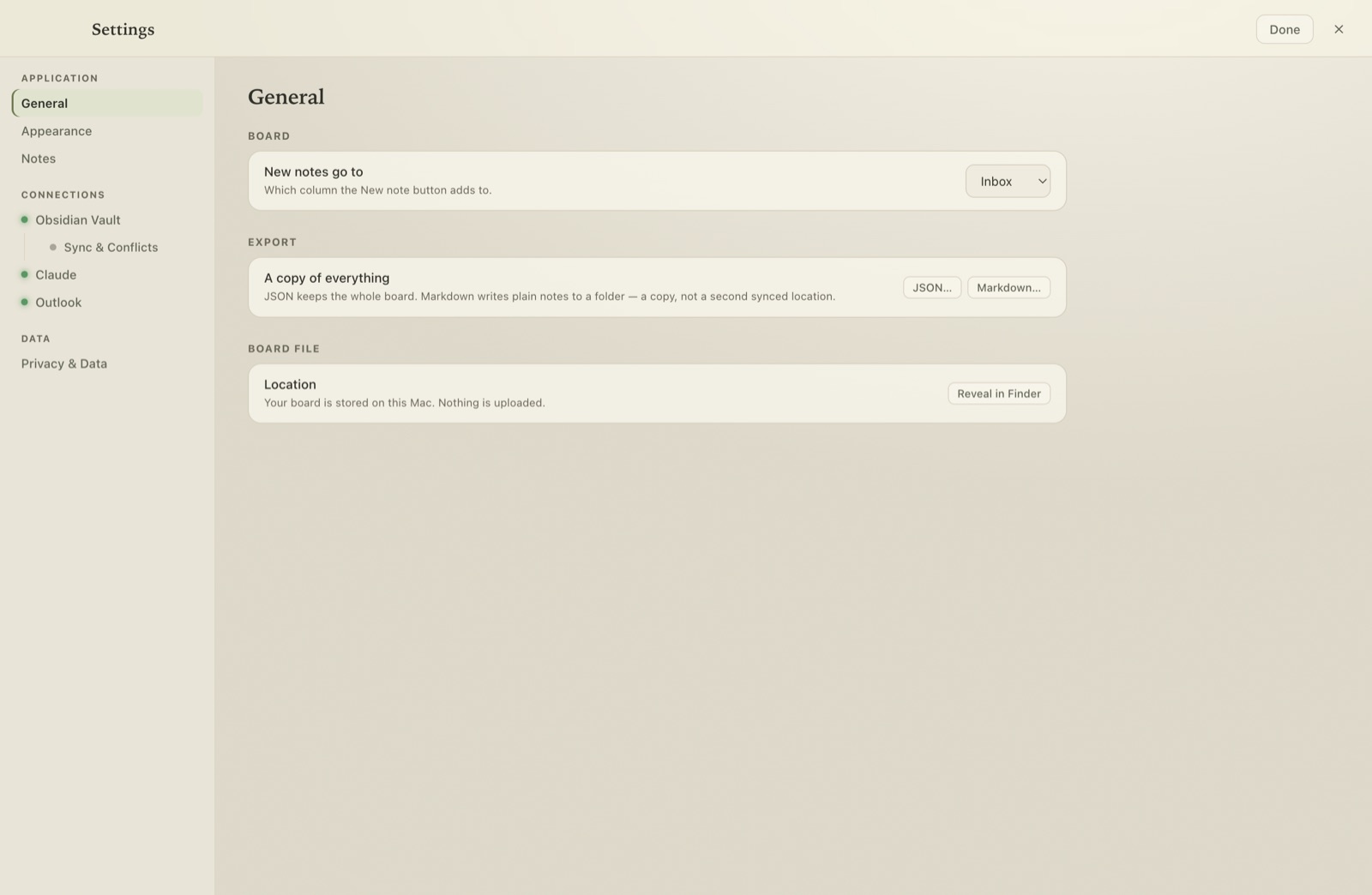
Claude, with no key. Sticky Brain talks to Claude through the claude CLI, which is already signed in to your account — nothing to paste, nothing billed separately. When the CLI is the backend it runs with every tool disabled, in a scratch directory. An Anthropic API key still works as a fallback.
Microsoft 365, locally. No Azure registration, no tokens, nothing over the network: mail and calendar are read from the Outlook app on this machine — over AppleScript on macOS, over Outlook's own automation (COM) on Windows — from whatever accounts you're already signed into. macOS asks once for permission (System Settings → Privacy & Security → Automation); Windows may show Outlook's "programmatic access" prompt, governed by its Trust Center. On Windows this works with classic Outlook. It's read-only — it cannot send mail or change your calendar.
Appearance
Two independent axes — a palette and a feel — so any of the four colors wears any of the three feels.
| Palette | Character |
|---|---|
| Light | Clean paper, warm neutrals, terracotta accent |
| Dark | Deep slate; note pigments drop in luminance so text stays light-on-dark |
| Natural | Linen and moss, serif headings, dye-plant pigments |
| Magical | Candlelit library — midnight and gilt, parchment notes, wax seals, drifting motes |
| Feel | Shape and space |
|---|---|
| Academia | Paper on a desk. Notes lean, corners curl, everything close at hand. The default. |
| Space | Linear and geometric. Nothing leans, nothing curls, square to the grid, with real room to breathe. |
| Organic | Soft edges. Generous radii, a lazy lean, diffuse shadows, borderless columns. |
Motion: Animated / Still. Still collapses every duration, removes the per-note tilt, and stops the magical theme's motes. The OS "reduce motion" preference is respected independently.
Keyboard
| Key | Does |
|---|---|
| Tab | Move between notes, handles and controls. Focus is always visible. |
| Space on a handle | Pick the note up |
| ↑ ↓ | Reorder within a column |
| ← → | Move to the column beside it |
| Space again | Drop it |
| Esc | Cancel the move, or close Settings and Triage |
Closing Settings or Triage returns focus to whatever opened it.
Data and secrets
- The board lives in
board.jsonunder your user data folder. Settings → General → Reveal in Finder opens it. Writes are atomic; an unreadable board is moved aside rather than overwritten, and a version upgrade backs up the old file first. - An optional Anthropic API key is encrypted with the OS keychain (macOS) or DPAPI (Windows) in
secrets.bin. It is never written toboard.json. - The vault is read-only until you turn writing on. Every path is checked to be inside the vault first, and folders too broad to be a vault (
/, your home folder, Documents, Desktop) are refused outright. - Export a copy of everything any time — JSON for the whole board, or plain markdown to a folder.
Install
Requirements: macOS 13 or later on Apple silicon, Windows 10/11 x64, or a glibc-based x64 Linux. Optional: Obsidian, the Outlook app, and Claude Code for Enrich.
Download: Mac .dmg · Windows installer · Windows portable .exe · Linux AppImage · Linux .deb · SHA-256 checksums.
Neither build is code-signed. On a Mac, the downloaded .dmg needs its quarantine flag cleared once (or right-click the app → Open):
On Windows, SmartScreen shows “Windows protected your PC” the first time — choose More info → Run anyway. The installer asks where to install; data lives in %APPDATA%\sticky-brain.
Questions
Does it need an account?
No. The board works with nothing connected. Claude features use the claude CLI you're already signed into; there's no Sticky Brain account anywhere.
Will it change my Obsidian notes?
Not unless you turn on markdown storage, and even then only files carrying a sticky-id inside the folder you chose. It never overwrites an edit you made, never deletes, and refuses mass changes. Everything is logged.
Can Claude run anything on my machine?
No. The CLI runs with every tool disabled in a scratch directory. Note text, vault content and email bodies are things you didn't write, so Claude is never given the ability to run commands or touch files while reading them.
Can it send email or move my meetings?
No. Outlook access is read-only. Drafts Claude writes stay drafts on the note.
Windows or Linux?
Both — one codebase ships all three platforms. On Windows the Microsoft 365 connection works with classic Outlook; on Linux the vault and Claude work exactly as everywhere, with Microsoft 365 available on macOS and Windows.
Is it free?
Yes. License and source details to follow.